
目录
在现代应用开发中,将强大的搜索引擎集成到 Spring Boot 应用中已成为标配。本文将深入探讨如何使用 Spring Data Elasticsearch 简化集成过程,提升开发效率。
什么是 Spring Data Elasticsearch?
Spring Data Elasticsearch 是 Spring Data 家族的一部分,它提供了与 Elasticsearch 交互的抽象和实现。主要优势包括:
-
简化操作:通过 Repository 抽象减少模板代码
-
对象映射:自动在 Java 对象和 Elasticsearch 文档间转换
-
查询派生:根据方法名自动生成查询
-
集成友好:与 Spring Boot 生态无缝集成
版本兼容性矩阵
版本兼容性是成功集成的关键,官方兼容版本:https://docs.spring.io/spring-data/elasticsearch/reference/elasticsearch/versions.html
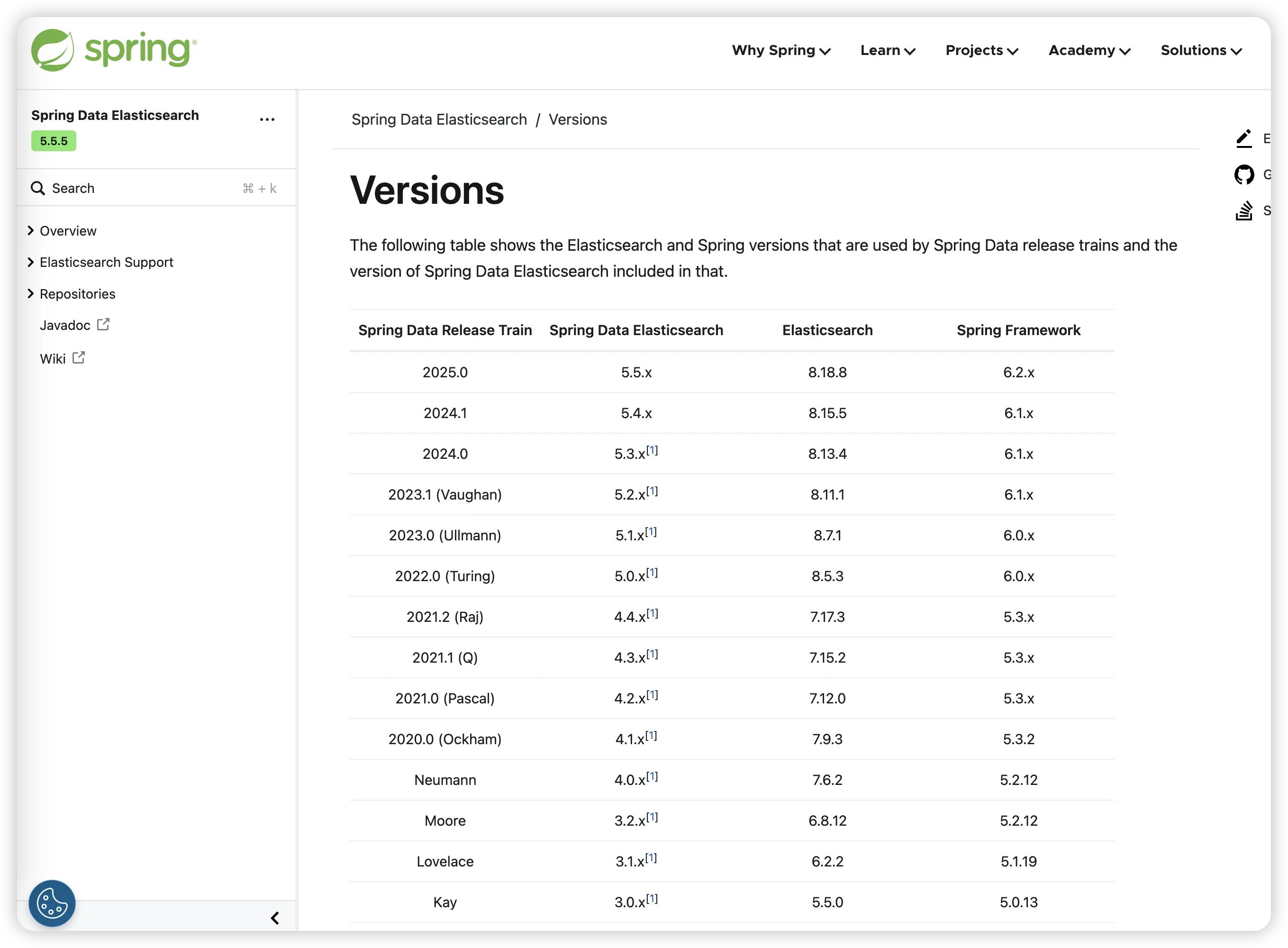
版本兼容
始终检查官方兼容性矩阵,避免版本冲突。
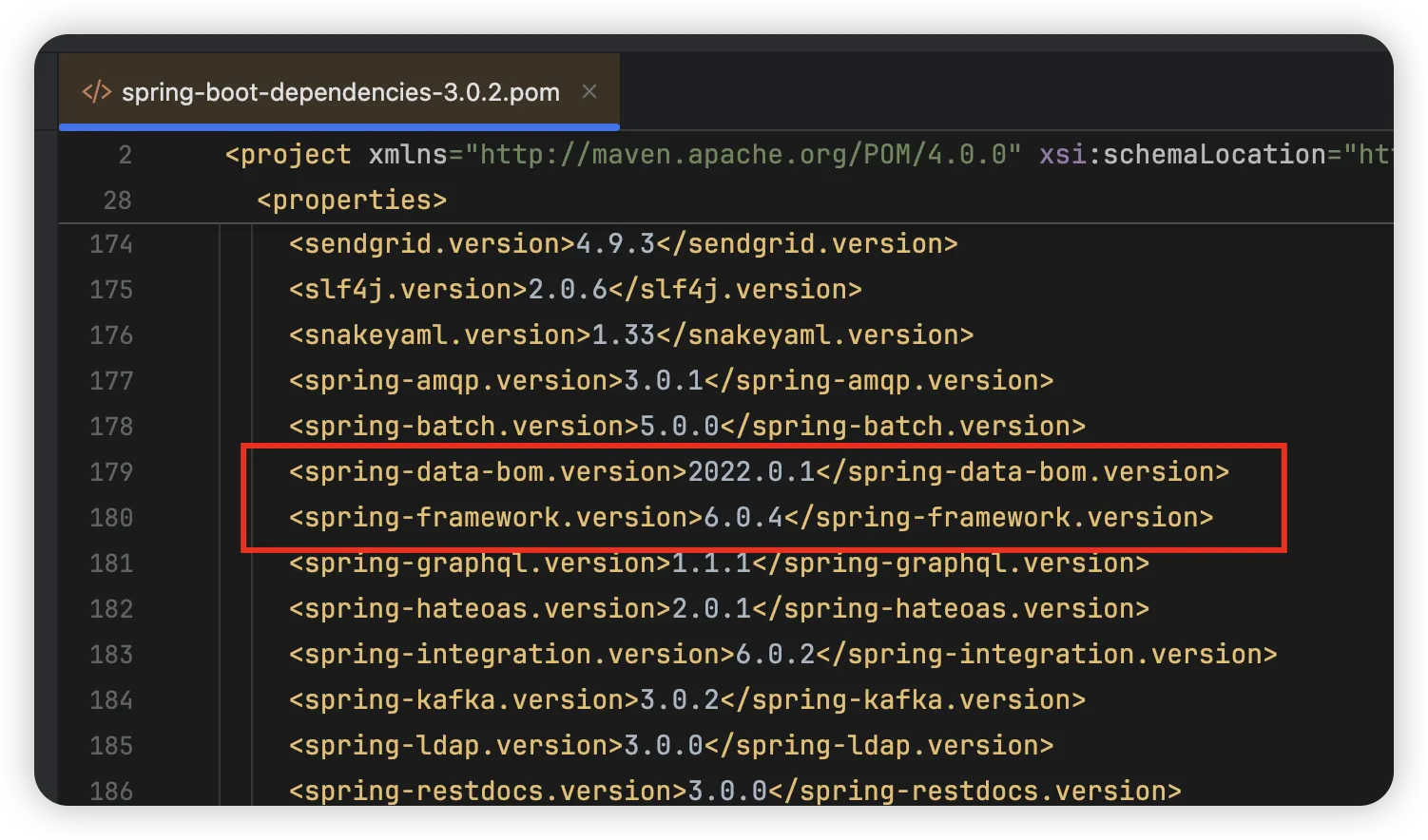
查看 Springboot pom 中的 spring-data-bom.version、spring-framework.version 版本与官方版本兼容进行对比,来选择合适的 es 版本。
示例:此处我使用的 Springboot 3.0.2 版本,结合 spring-data-bom.version 是 2022.0.1,spring-framework.version 是 6.0.4,所以选择的 ES 版本是 8.5.3
环境搭建与配置
添加 Maven 依赖
xml<dependencies>
    <dependency>
        <groupId>org.springframework.boot</groupId>
        <artifactId>spring-boot-starter-data-elasticsearch</artifactId>
    </dependency>
</dependencies>
配置文件
application.yml:
yamlspring:
  elasticsearch:
    uris: http://localhost:9200
    # 可选配置
    connection-timeout: 1s
    socket-timeout: 30s
    username: elastic  # 如果启用了安全认证
    password: your_password
配置类(可选)
对于更复杂的配置,可以创建配置类:
java@Configuration
@EnableElasticsearchRepositories(basePackages = "com.example.repository")
public class ElasticsearchConfig {

    @Bean
    public ElasticsearchOperations elasticsearchTemplate(ElasticsearchRestClient client) {
        return new ElasticsearchRestTemplate(client);
    }

    // 自定义 Jackson 映射器(可选)
    @Bean
    public ElasticsearchCustomConversions elasticsearchCustomConversions() {
        return new ElasticsearchCustomConversions(
            Arrays.asList(new DateToLongConverter(), new LongToDateConverter())
        );
    }

    @WritingConverter
    static class DateToLongConverter implements Converter<Date, Long> {
        @Override
        public Long convert(Date source) {
            return source.getTime();
        }
    }

    @ReadingConverter
    static class LongToDateConverter implements Converter<Long, Date> {
        @Override
        public Date convert(Long source) {
            return new Date(source);
        }
    }
}
实体映射(Document Mapping)
基础实体映射
javapackage com.example.model;

import org.springframework.data.annotation.Id;
import org.springframework.data.elasticsearch.annotations.Document;
import org.springframework.data.elasticsearch.annotations.Field;
import org.springframework.data.elasticsearch.annotations.FieldType;

import java.time.LocalDateTime;
import java.util.List;

// 手动创建索引
@Document(indexName = "products", createIndex = false)
public class Product {

    @Id
    private String id;

    // 中文全文检索
    @Field(type = FieldType.Text, analyzer = "ik_max_word")
    private String name;

    @Field(type = FieldType.Text, analyzer = "ik_smart")
    private String description;

    @Field(type = FieldType.Double)
    private Double price;

    // 精确匹配
    @Field(type = FieldType.Keyword)
    private String category;

    @Field(type = FieldType.Keyword)
    private List<String> tags;

    @Field(type = FieldType.Boolean)
    private Boolean available;

    // Elasticsearch 7.x 默认日期格式为 strict_date_optional_time,需在实体类中显式指定格式
    @Field(type = FieldType.Date, format = DateFormat.custom, pattern = "yyyy-MM-dd HH:mm:ss")
    private LocalDateTime createTime;

    @Field(type = FieldType.Integer)
    private Integer stockCount;

    // 构造函数
    public Product() {}

    public Product(String name, String description, Double price, String category) {
        this.name = name;
        this.description = description;
        this.price = price;
        this.category = category;
        this.createTime = LocalDateTime.now();
        this.available = true;
    }

    // Getter 和 Setter 方法
    public String getId() { return id; }
    public void setId(String id) { this.id = id; }

    public String getName() { return name; }
    public void setName(String name) { this.name = name; }

    public String getDescription() { return description; }
    public void setDescription(String description) { this.description = description; }

    public Double getPrice() { return price; }
    public void setPrice(Double price) { this.price = price; }

    public String getCategory() { return category; }
    public void setCategory(String category) { this.category = category; }

    public List<String> getTags() { return tags; }
    public void setTags(List<String> tags) { this.tags = tags; }

    public Boolean getAvailable() { return available; }
    public void setAvailable(Boolean available) { this.available = available; }

    public LocalDateTime getCreateTime() { return createTime; }
    public void setCreateTime(LocalDateTime createTime) { this.createTime = createTime; }

    public Integer getStockCount() { return stockCount; }
    public void setStockCount(Integer stockCount) { this.stockCount = stockCount; }
}
高级映射配置
java// 嵌套对象映射
public class Author {
    @Field(type = FieldType.Keyword)
    private String name;

    @Field(type = FieldType.Keyword)
    private String email;

    // getter/setter
}

// 在 Book 实体中使用嵌套对象
@Document(indexName = "books")
public class Book {
    @Id
    private String id;

    @Field(type = FieldType.Text, analyzer = "ik_max_word")
    private String title;

    @Field(type = FieldType.Nested)
    private List<Author> authors;

    @Field(type = FieldType.Date, format = DateFormat.date_hour_minute_second)
    private LocalDateTime publishDate;

    @Field(type = FieldType.Object, enabled = false) // 不索引该字段
    private Map<String, Object> metadata;

    // 地理位置字段
    @GeoPointField
    private GeoPoint location;

    // getter/setter
}
自动创建索引和映射
Spring Data Elasticsearch 可以自动创建索引和映射:
java@Configuration
public class ElasticsearchConfiguration {

    @Bean
    public boolean createIndexAndMapping(RestHighLevelClient client, ElasticsearchRestTemplate template) {
        try {
            // 检查索引是否存在,不存在则创建
            if (!template.indexOps(Product.class).exists()) {
            template.indexOps(Product.class).create();
            template.indexOps(Product.class).putMapping();
            }
            return true;
        } catch (Exception e) {
            // 处理异常
            return false;
        }
    }
}
Repository 基础操作
基础 Repository 接口
javapackage com.example.repository;

import com.example.model.Product;
import org.springframework.data.elasticsearch.repository.ElasticsearchRepository;
import org.springframework.stereotype.Repository;

import java.util.List;

@Repository
public interface ProductRepository extends ElasticsearchRepository<Product, String> {

    // 基本的 CRUD 操作已由父接口提供
    // save(), findById(), findAll(), count(), delete(), etc.
}
服务层实现
java@Service
public class ProductService {

    private final ProductRepository productRepository;

    public ProductService(ProductRepository productRepository) {
        this.productRepository = productRepository;
    }

    // 基础 CRUD 操作
    public Product save(Product product) {
        return productRepository.save(product);
    }

    public List<Product> saveAll(List<Product> products) {
        return (List<Product>) productRepository.saveAll(products);
    }

    public Optional<Product> findById(String id) {
        return productRepository.findById(id);
    }

    public List<Product> findAll() {
        return (List<Product>) productRepository.findAll();
    }

    public void deleteById(String id) {
        productRepository.deleteById(id);
    }

    public long count() {
        return productRepository.count();
    }

    public boolean existsById(String id) {
        return productRepository.existsById(id);
    }
}
控制器层
java@RestController
@RequestMapping("/api/products")
public class ProductController {

    private final ProductService productService;

    public ProductController(ProductService productService) {
        this.productService = productService;
    }

    @PostMapping
    public ResponseEntity<Product> createProduct(@RequestBody Product product) {
        Product savedProduct = productService.save(product);
        return ResponseEntity.status(HttpStatus.CREATED).body(savedProduct);
    }

    @GetMapping("/{id}")
    public ResponseEntity<Product> getProduct(@PathVariable String id) {
        Optional<Product> product = productService.findById(id);
        return product.map(ResponseEntity::ok)
                     .orElse(ResponseEntity.notFound().build());
    }

    @GetMapping
    public ResponseEntity<List<Product>> getAllProducts() {
        List<Product> products = productService.findAll();
        return ResponseEntity.ok(products);
    }

    @DeleteMapping("/{id}")
    public ResponseEntity<Void> deleteProduct(@PathVariable String id) {
        if (productService.existsById(id)) {
            productService.deleteById(id);
            return ResponseEntity.noContent().build();
        }
        return ResponseEntity.notFound().build();
    }
}
查询方法详解
方法名派生查询
Spring Data 可以根据方法名自动生成查询:
javapublic interface ProductRepository extends ElasticsearchRepository<Product, String> {

    // 精确匹配
    List<Product> findByCategory(String category);

    // 比较操作
    List<Product> findByPriceGreaterThan(Double price);
    List<Product> findByPriceBetween(Double startPrice, Double endPrice);

    // 文本搜索
    List<Product> findByName(String name);
    List<Product> findByNameContaining(String name);
    List<Product> findByNameLike(String name);

    // 布尔操作
    List<Product> findByAvailableTrue();
    List<Product> findByAvailableFalse();

    // 多条件查询
    List<Product> findByCategoryAndPriceLessThan(String category, Double price);
    List<Product> findByCategoryOrAvailableTrue(String category);

    // 排序
    List<Product> findByCategoryOrderByPriceDesc(String category);

    // 分页
    Page<Product> findByCategory(String category, Pageable pageable);

    // 限制结果数量
    List<Product> findTop5ByCategoryOrderByPriceDesc(String category);

    // 嵌套对象查询
    List<Product> findByTagsContains(String tag);

    // 存在性检查
    List<Product> findByDescriptionIsNotNull();

    // 排除查询
    List<Product> findByCategoryNot(String category);
}
使用 @Query 注解
对于复杂查询,可以使用 @Query 注解:
javapublic interface ProductRepository extends ElasticsearchRepository<Product, String> {

    // 使用 JSON DSL 查询
    @Query("""
    {
      "bool": {
        "must": [
          { "match": { "name": "?0" } },
          { "range": {
            "price": {
              "gte": ?1,
              "lte": ?2
            }
          }}
        ]
      }
    }
    """)
    List<Product> findByNameAndPriceRange(String name, Double minPrice, Double maxPrice);

    // 全文搜索
    @Query("""
    {
      "multi_match": {
        "query": "?0",
        "fields": ["name^2", "description", "tags"]
      }
    }
    """)
    List<Product> fullTextSearch(String keyword);

    // 聚合查询
    @Query("""
    {
      "size": 0,
      "aggs": {
        "categories": {
          "terms": { "field": "category.keyword" }
        }
      }
    }
    """)
    SearchHits<Product> getCategoryAggregation();

    // 高亮查询
    @Query("""
    {
      "query": {
        "match": { "description": "?0" }
      },
      "highlight": {
        "fields": {
          "description": {}
        }
      }
    }
    """)
    SearchHits<Product> findWithHighlight(String keyword);
}
分页和排序
java@Service
public class ProductSearchService {

    private final ProductRepository productRepository;

    public ProductSearchService(ProductRepository productRepository) {
        this.productRepository = productRepository;
    }

    // 分页查询
    public Page<Product> searchProducts(String category, int page, int size) {
        Pageable pageable = PageRequest.of(page, size, Sort.by("price").descending());
        return productRepository.findByCategory(category, pageable);
    }

    // 复杂分页和排序
    public Page<Product> searchProductsWithSort(String category, int page, int size, String sortBy, String direction) {
        Sort sort = direction.equalsIgnoreCase("asc") ?
            Sort.by(sortBy).ascending() : Sort.by(sortBy).descending();
        Pageable pageable = PageRequest.of(page, size, sort);
        return productRepository.findByCategory(category, pageable);
    }

    // 多字段排序
    public Page<Product> searchWithMultipleSort(String category, int page, int size) {
        Sort sort = Sort.by("price").descending()
                       .and(Sort.by("createTime").descending());
        Pageable pageable = PageRequest.of(page, size, sort);
        return productRepository.findByCategory(category, pageable);
    }
}
ElasticsearchRestTemplate 高级操作
复杂查询构建
java@Service
public class AdvancedProductService {

    private final ElasticsearchRestTemplate elasticsearchTemplate;

    public AdvancedProductService(ElasticsearchRestTemplate elasticsearchTemplate) {
        this.elasticsearchTemplate = elasticsearchTemplate;
    }

    // 构建复杂查询
    public SearchHits<Product> complexSearch(ProductSearchCriteria criteria) {
        NativeSearchQueryBuilder queryBuilder = new NativeSearchQueryBuilder();

        // 添加查询条件
        BoolQueryBuilder boolQuery = QueryBuilders.boolQuery();

        if (StringUtils.hasText(criteria.getKeyword())) {
            boolQuery.must(QueryBuilders.multiMatchQuery(criteria.getKeyword(),
                        "name", "description", "tags"));
        }

        if (StringUtils.hasText(criteria.getCategory())) {
            boolQuery.filter(QueryBuilders.termQuery("category", criteria.getCategory()));
        }

        if (criteria.getMinPrice() != null && criteria.getMaxPrice() != null) {
            boolQuery.filter(QueryBuilders.rangeQuery("price")
                        .gte(criteria.getMinPrice())
                        .lte(criteria.getMaxPrice()));
        }

        if (criteria.getAvailable() != null) {
            boolQuery.filter(QueryBuilders.termQuery("available", criteria.getAvailable()));
        }

        queryBuilder.withQuery(boolQuery);

        // 添加排序
        if (StringUtils.hasText(criteria.getSortBy())) {
            queryBuilder.withSort(SortBuilders.fieldSort(criteria.getSortBy())
                            .order(criteria.isAscending() ? SortOrder.ASC : SortOrder.DESC));
        }

        // 添加分页
        queryBuilder.withPageable(PageRequest.of(criteria.getPage(), criteria.getSize()));

        // 添加高亮
        if (StringUtils.hasText(criteria.getKeyword())) {
            queryBuilder.withHighlightFields(
                new HighlightBuilder.Field("name"),
                new HighlightBuilder.Field("description")
            );
        }

        NativeSearchQuery searchQuery = queryBuilder.build();
        return elasticsearchTemplate.search(searchQuery, Product.class);
    }

    // 聚合查询
    public Map<String, Long> getCategoryStats() {
        NativeSearchQuery searchQuery = new NativeSearchQueryBuilder()
            .withQuery(QueryBuilders.matchAllQuery())
            .addAggregation(AggregationBuilders.terms("categories").field("category.keyword"))
            .build();

        SearchHits<Product> searchHits = elasticsearchTemplate.search(searchQuery, Product.class);
        Terms categories = searchHits.getAggregations().get("categories");

        return categories.getBuckets().stream()
            .collect(Collectors.toMap(
                Terms.Bucket::getKeyAsString,
                Terms.Bucket::getDocCount
            ));
    }

    // 批量操作
    public void bulkIndexProducts(List<Product> products) {
        List<IndexQuery> queries = products.stream()
            .map(product -> new IndexQueryBuilder()
                .withId(product.getId())
                .withObject(product)
                .build())
            .collect(Collectors.toList());

        elasticsearchTemplate.bulkIndex(queries, BulkOptions.defaultOptions());
    }
}
搜索条件封装
javapublic class ProductSearchCriteria {
    private String keyword;
    private String category;
    private Double minPrice;
    private Double maxPrice;
    private Boolean available;
    private String sortBy = "createTime";
    private boolean ascending = false;
    private int page = 0;
    private int size = 20;

    // getter 和 setter 方法
    public String getKeyword() { return keyword; }
    public void setKeyword(String keyword) { this.keyword = keyword; }

    public String getCategory() { return category; }
    public void setCategory(String category) { this.category = category; }

    public Double getMinPrice() { return minPrice; }
    public void setMinPrice(Double minPrice) { this.minPrice = minPrice; }

    public Double getMaxPrice() { return maxPrice; }
    public void setMaxPrice(Double maxPrice) { this.maxPrice = maxPrice; }

    public Boolean getAvailable() { return available; }
    public void setAvailable(Boolean available) { this.available = available; }

    public String getSortBy() { return sortBy; }
    public void setSortBy(String sortBy) { this.sortBy = sortBy; }

    public boolean isAscending() { return ascending; }
    public void setAscending(boolean ascending) { this.ascending = ascending; }

    public int getPage() { return page; }
    public void setPage(int page) { this.page = page; }

    public int getSize() { return size; }
    public void setSize(int size) { this.size = size; }
}
实战案例:电商搜索系统
完整搜索服务实现
java@Service
public class EcommerceSearchService {

    private final ProductRepository productRepository;
    private final ElasticsearchRestTemplate elasticsearchTemplate;

    public EcommerceSearchService(ProductRepository productRepository,
                                 ElasticsearchRestTemplate elasticsearchTemplate) {
        this.productRepository = productRepository;
        this.elasticsearchTemplate = elasticsearchTemplate;
    }

    // 商品搜索
    public SearchResult<Product> searchProducts(ProductSearchRequest request) {
        NativeSearchQueryBuilder queryBuilder = new NativeSearchQueryBuilder();

        // 构建查询
        BoolQueryBuilder boolQuery = QueryBuilders.boolQuery();

        // 关键词搜索
        if (StringUtils.hasText(request.getQ())) {
            boolQuery.must(QueryBuilders.multiMatchQuery(request.getQ())
                        .fields("name^3", "description^2", "tags")
                        .type(MultiMatchQueryBuilder.Type.BEST_FIELDS));
        }

        // 分类过滤
        if (request.getCategories() != null && !request.getCategories().isEmpty()) {
            boolQuery.filter(QueryBuilders.termsQuery("category", request.getCategories()));
        }

        // 价格范围
        if (request.getMinPrice() != null || request.getMaxPrice() != null) {
            RangeQueryBuilder rangeQuery = QueryBuilders.rangeQuery("price");
            if (request.getMinPrice() != null) rangeQuery.gte(request.getMinPrice());
            if (request.getMaxPrice() != null) rangeQuery.lte(request.getMaxPrice());
            boolQuery.filter(rangeQuery);
        }

        // 库存过滤
        if (request.getInStockOnly() != null && request.getInStockOnly()) {
            boolQuery.filter(QueryBuilders.termQuery("available", true));
        }

        queryBuilder.withQuery(boolQuery);

        // 高亮配置
        if (StringUtils.hasText(request.getQ())) {
            queryBuilder.withHighlightFields(
                new HighlightBuilder.Field("name").preTags("<em>").postTags("</em>"),
                new HighlightBuilder.Field("description").preTags("<em>").postTags("</em>")
            );
        }

        // 分页和排序
        Sort sort = buildSort(request.getSort());
        Pageable pageable = PageRequest.of(request.getPage(), request.getSize(), sort);
        queryBuilder.withPageable(pageable);

        NativeSearchQuery searchQuery = queryBuilder.build();
        SearchHits<Product> searchHits = elasticsearchTemplate.search(searchQuery, Product.class);

        return buildSearchResult(searchHits, pageable);
    }

    // 构建排序
    private Sort buildSort(String sortType) {
        if ("price_asc".equals(sortType)) {
            return Sort.by("price").ascending();
        } else if ("price_desc".equals(sortType)) {
            return Sort.by("price").descending();
        } else if ("newest".equals(sortType)) {
            return Sort.by("createTime").descending();
        } else {
            return Sort.by("_score").descending();
        }
    }

    // 构建搜索结果
    private SearchResult<Product> buildSearchResult(SearchHits<Product> searchHits, Pageable pageable) {
        List<Product> products = searchHits.getSearchHits().stream()
            .map(hit -> {
                Product product = hit.getContent();

                // 处理高亮
                if (hit.getHighlightFields() != null && !hit.getHighlightFields().isEmpty()) {
                    Map<String, List<String>> highlightFields = hit.getHighlightFields();

                    if (highlightFields.containsKey("name")) {
                        product.setName(highlightFields.get("name").get(0));
                    }

                    if (highlightFields.containsKey("description")) {
                        product.setDescription(highlightFields.get("description").get(0));
                    }
                }

                return product;
            })
            .collect(Collectors.toList());

        return new SearchResult<>(
            products,
            searchHits.getTotalHits(),
            pageable.getPageNumber(),
            pageable.getPageSize()
        );
    }

    // 分类统计
    public Map<String, Object> getCategoryStats() {
        NativeSearchQuery searchQuery = new NativeSearchQueryBuilder()
            .withQuery(QueryBuilders.matchAllQuery())
            .addAggregation(AggregationBuilders.terms("categories").field("category.keyword"))
            .addAggregation(AggregationBuilders.stats("price_stats").field("price"))
            .build();

        SearchHits<Product> searchHits = elasticsearchTemplate.search(searchQuery, Product.class);

        Map<String, Object> stats = new HashMap<>();

        // 分类聚合
        Terms categories = searchHits.getAggregations().get("categories");
        stats.put("categories", categories.getBuckets().stream()
            .collect(Collectors.toMap(
                Terms.Bucket::getKeyAsString,
                Terms.Bucket::getDocCount
            )));

        // 价格统计
        Stats priceStats = searchHits.getAggregations().get("price_stats");
        stats.put("price_stats", Map.of(
            "min", priceStats.getMin(),
            "max", priceStats.getMax(),
            "avg", priceStats.getAvg(),
            "count", priceStats.getCount()
        ));

        return stats;
    }
}

// 搜索结果封装类
public class SearchResult<T> {
    private List<T> content;
    private long total;
    private int page;
    private int size;
    private int totalPages;

    public SearchResult(List<T> content, long total, int page, int size) {
        this.content = content;
        this.total = total;
        this.page = page;
        this.size = size;
        this.totalPages = (int) Math.ceil((double) total / size);
    }

    // getter 方法
    public List<T> getContent() { return content; }
    public long getTotal() { return total; }
    public int getPage() { return page; }
    public int getSize() { return size; }
    public int getTotalPages() { return totalPages; }
}

// 搜索请求封装类
public class ProductSearchRequest {
    private String q;
    private List<String> categories;
    private Double minPrice;
    private Double maxPrice;
    private Boolean inStockOnly;
    private String sort = "relevance";
    private int page = 0;
    private int size = 20;

    // getter 和 setter 方法
    // ...
}
最佳实践与性能优化
配置优化
java@Configuration
public class ElasticsearchPerformanceConfig {

    @Bean
    public ElasticsearchRestTemplate elasticsearchTemplate(ElasticsearchRestClient client) {
        return new ElasticsearchRestTemplate(client);
    }

    // 配置连接池
    @Bean
    public RestClientBuilderCustomizer restClientBuilderCustomizer() {
        return builder -> builder
            .setRequestConfigCallback(requestConfigBuilder ->
                requestConfigBuilder
                    .setConnectTimeout(5000)
                    .setSocketTimeout(60000))
            .setHttpClientConfigCallback(httpClientBuilder ->
                httpClientBuilder
                    .setMaxConnTotal(100)
                    .setMaxConnPerRoute(50));
    }
}
性能优化建议
合理使用索引:
java// 为频繁查询的字段创建索引
@Field(type = FieldType.Keyword)
private String category;
批量操作:
java// 使用批量操作提升性能
public void bulkIndex(List<Product> products) {
    List<IndexQuery> queries = products.stream()
        .map(product -> new IndexQueryBuilder()
            .withId(product.getId())
            .withObject(product)
            .build())
        .collect(Collectors.toList());

    elasticsearchTemplate.bulkIndex(queries, BulkOptions.defaultOptions());
}
避免 N+1 查询问题:
java// 使用一次查询获取所有需要的数据,而不是循环查询
public List<Product> findProductsByIds(List<String> ids) {
    NativeSearchQuery query = new NativeSearchQueryBuilder()
        .withQuery(QueryBuilders.termsQuery("_id", ids))
        .build();
    return elasticsearchTemplate.search(query, Product.class)
        .getSearchHits().stream()
        .map(SearchHit::getContent)
        .collect(Collectors.toList());
}
总结
通过本文,我们深入探讨了 Spring Data Elasticsearch 的各个方面:
-
环境配置:版本兼容性、依赖配置、连接设置
-
实体映射:注解配置、嵌套对象、自定义转换器
-
Repository 模式:方法名派生查询、@Query 注解、分页排序
-
高级操作:ElasticsearchRestTemplate 复杂查询、聚合分析
-
实战案例:完整的电商搜索系统实现
-
性能优化:配置调优、批量操作、最佳实践
核心价值:
-
开发效率:大幅减少样板代码,提升开发速度
-
维护性:清晰的代码结构,易于维护和扩展
-
灵活性:支持从简单到复杂的各种搜索场景
-
生态集成:完美融入 Spring Boot 生态系统
Spring Data Elasticsearch 让 Elasticsearch 的集成变得简单而强大,是现代 Java 应用实现搜索功能的理想选择。


本文作者:柳始恭
本文链接:
版权声明:本博客所有文章除特别声明外,均采用 BY-NC-SA 许可协议。转载请注明出处!